7 habits to move from casual to productive use of Claude in 2026

1. Create a central Claude folder or project
The first habit is the simplest, yet the least practiced. Most users open a new conversation every time they want to talk to Claude, never building on their previous interactions.
The best practice is to create a Claude project for each work domain: one project for your current role, one per major client account, and one per recurring theme (market research, presentations, internal memos). Each project becomes a persistent workspace where Claude retains the context, the documents you upload, and the instructions you provide.
The immediate result: you no longer have to re-explain your context in every conversation. Claude already knows who you work for, your internal codes, and your standard deliverables. A well-named and regularly updated project saves you several hours of context-setting every week.

2. Write custom instructions that reflect your style
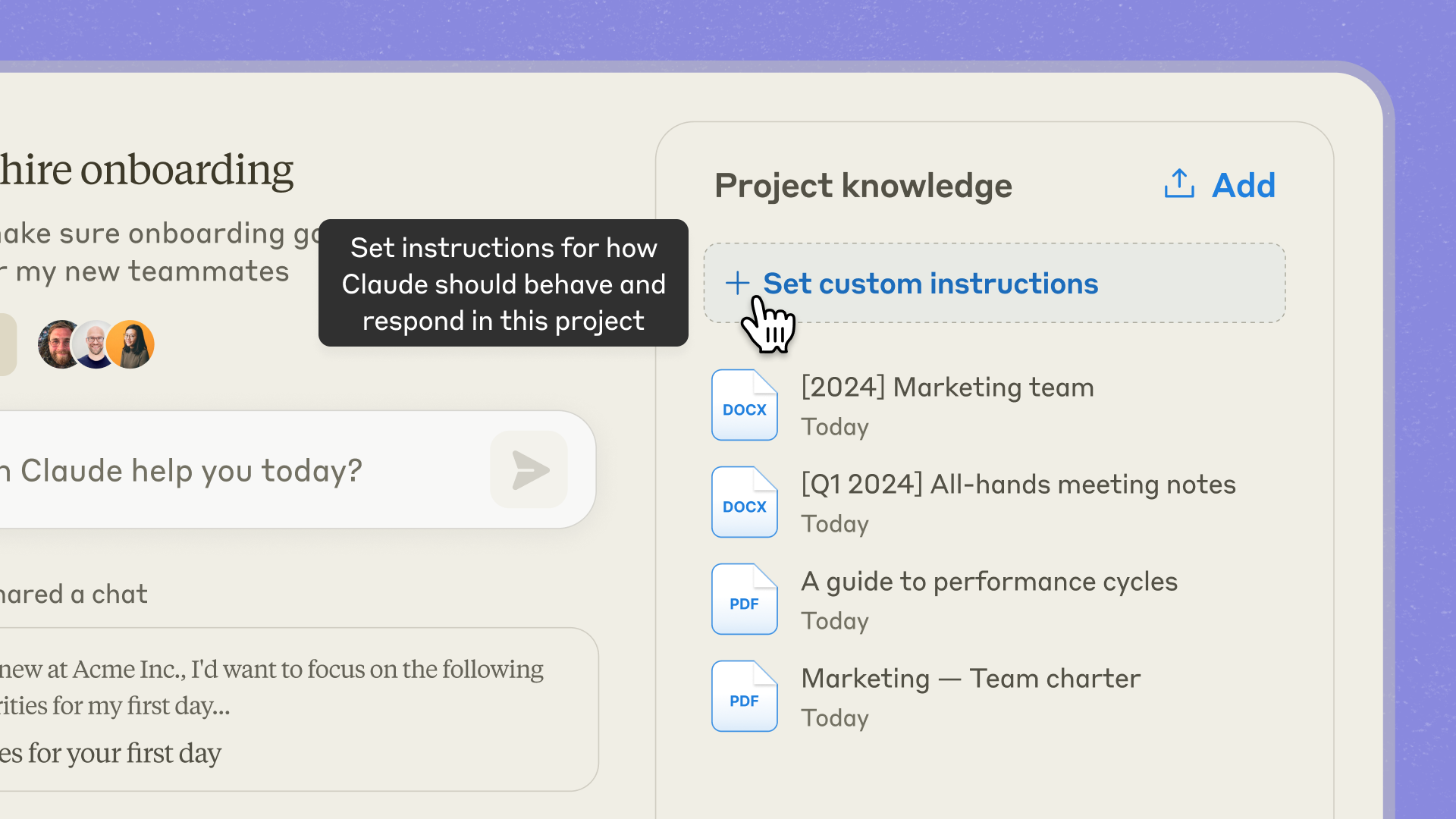
The second habit, and the one that most radically transforms the quality of responses, is to draft custom instructions for every project.
These instructions describe who you are, what you expect from Claude, your writing style, and your requirements for form and content. They are read at the start of every new conversation in this project, and they guide everything Claude produces thereafter.
Examples of instructions worth writing once and for all: “Use a calm and educational tone, like in a consulting report. Avoid bullet points unless the structure justifies them. Never put a title at the beginning of a paragraph. Write in French, unless otherwise indicated.”
These few lines save a considerable amount of time and harmonize your deliverables without having to manually correct them every time. The difference between a user who has written their permanent instructions and one who hasn't is dramatic from the very first response.
3. Connect your data sources via MCP
Third habit, which unlocks a new dimension of usage: connecting Claude to your tools via the MCP protocol (Model Context Protocol).
In practical terms, MCP allows Claude to access your professional data sources directly: Slack, Google Workspace, Microsoft 365, Notion, GitHub, Jira, Salesforce, your internal CRM, and your knowledge base. Claude can then read, search, summarize, and analyze this content without you having to manually copy and paste it into a conversation.
The benefit is twofold. First, you save a significant amount of time on extraction and formatting tasks. Second, Claude becomes a true research assistant across your systems, capable of finding information in a Slack message from last week and cross-referencing it with a Notion document and a SharePoint report.
MCP requires an initial setup (activating connectors, permissions) that takes about thirty minutes. It is an investment that pays for itself from the very first complex search.

4. Reuse Skills instead of explaining them every time
Fourth habit: build a library of Skills so you never have to explain a method again.
A Skill is a reusable capability that you define once and for all. For example, a “Credit Analysis Note” Skill that describes the expected structure, the sections to cover, the tone to adopt, and the evaluation criteria. Once created, this Skill is triggered automatically whenever you ask Claude to produce a note of this type, in any conversation.
This logic applies to everything repetitive in your work: a Skill for your meeting minutes, a Skill for contract reviews, a Skill for preparing client presentations, and a Skill for summarizing scientific articles.
A library of ten to twenty well-built Skills represents several weeks of cumulative productivity over the course of a year. And once built, these Skills can be shared within a team to align everyone on the same standards.

5. Delegate long-running tasks to Cowork mode
Fifth habit: recognize tasks that don't deserve your real-time attention and delegate them to Claude's Cowork mode.
As of September 16, 2026, Claude Chat and Claude Cowork have merged into a single application. Cowork mode is now integrated into the Claude app, allowing Claude to access a folder on your computer, read and write files, and execute commands autonomously for long-running tasks—directly from the conversation. You make your request, close the window, and Claude brings back the finished deliverable.
Typical use cases include: sorting and organizing a folder with hundreds of files, cleaning up a 20,000-row Excel spreadsheet, extracting key information from a stack of PDFs, generating a presentation from a source document, or producing a literature review from a corpus of articles.
The best approach is to identify two or three tasks each week that would take you one to three hours to do manually, and assign them to Cowork mode in the morning. You'll find them completed by the end of the morning, allowing you to focus on the matters that truly require your attention.

6. Schedule recurring tasks with Scheduling
Sixth habit: stop manually repeating time-consuming tasks, thanks to Scheduling.
Scheduling allows you to program Claude tasks to run automatically at regular intervals. A morning brief every day at 8:00 AM that compiles important emails and industry news. A weekly update every Monday that scans your favorite sources and summarizes them for you. A monthly dashboard that pulls your sales data and produces a formatted report ready to send.
The difference compared to a standard automation workflow is fundamental: Claude doesn't just execute a fixed script; it reasons with every execution. If an unusual event occurs, it identifies and incorporates it. If a source changes its format, it adapts. You get a relevant deliverable every time, not just a mechanical execution.
Three or four well-designed Scheduled tasks are enough to transform how you organize your workday.
.jpg)
7. Co-building over time for a better Claude
The seventh and final habit, the most subtle and arguably the most powerful: treat Claude like a collaborator who improves over time, and co-build your instructions, Skills, and projects with it.
In practical terms, every time Claude gives you an imperfect answer, don't just correct it within the conversation. Make it a habit to update the system instruction or the Skill that produced that result. The next time you make the same request, the answer will be better.
This virtuous cycle turns your Claude environment into a system that learns from you continuously. After six months of regular use with this habit, your Claude will feel like an assistant that knows your preferences, your standards, and your requirements, producing on the first try what others would have to revise repeatedly.
This habit is what separates users who plateau after three months from those who continue to improve after three years.

What you should absolutely avoid
Three classic mistakes often ruin the efforts of users who are trying to do things the right way.
1. Creating too many projects and Skills without a plan. Having fifty vaguely named projects and thirty redundant Skills is worse than having nothing at all. The best practice is to start with a few well-thought-out projects and evolve your structure gradually.
2. Copy-pasting sensitive data without checking the settings. By default, the Free and Pro plans allow Anthropic to use your conversations to improve their models (though you can opt out in the settings). In a professional context, the best practice is to switch to Team or Enterprise, where this is not the case.
3. Expecting Claude to guess everything. Claude is powerful, but it isn't telepathic. A user who takes two minutes to clearly frame their request will consistently get better results than one who sends a vague sentence hoping Claude will fill in the blanks.
Going further
These seven habits require no technical skills. However, they do require some time to set up correctly, and above all, a method to identify which ones will have the most impact in your professional context.
This is precisely what our training Mastering Claude in the Workplace covers: one day to set up the right configurations, build your first projects and Skills, connect Claude to your tools via MCP, and leave with a productive Claude environment tailored to your role.
Our training is conducted in-house, is Qualiopi-certified, and is eligible for OPCO funding. It is designed for any team looking to move from casual chatbot use to productive use of Claude, with no technical prerequisites required.
FAQ: Using Claude effectively in your daily work
How do I start using Claude productively from scratch?
The best way to get started is to create your first Claude project dedicated to your main work, write a few lines of custom instructions about yourself and your expectations, and upload your two or three most important reference documents (org chart, internal glossary, summary notes). This foundation immediately transforms the quality of your interactions.
What is a Claude project and what is it for?
A project is a persistent workspace where Claude keeps the context, files, and custom instructions you provide. Unlike a one-off conversation, a project allows you to build up knowledge over time and access that context in every new conversation within that project.
What are custom instructions?
These are instructions you write once and for all, which Claude reviews at the start of every conversation within a project. They describe your role, style, requirements, and constraints, saving you from having to re-explain your context every time.
What is MCP and how does it work?
MCP (Model Context Protocol) is an open protocol that allows Claude to connect to your external tools (Slack, Google Workspace, Notion, GitHub, Salesforce, etc.). Once an MCP connector is enabled, Claude can read, search, and interact with these tools as if it were a native user.
What is a Claude Skill?
A Skill is a reusable capability that you define once and for all: an analysis method, a deliverable format, a writing style, or a checklist. Once created, the Skill is triggered automatically when Claude detects it is needed, without you having to specify it every time.
What is the role of Cowork mode in the Claude app since 2026?
Since September 16, 2026, Claude Chat and Claude Cowork have merged into a single application. Cowork mode remains the best option for long, autonomous tasks on a local folder (reading, writing, executing commands, delivering a finished result), while the classic conversational mode remains suited for quick exchanges and ad-hoc questions. You can switch between them without changing applications.
Is it possible to share my permanent instructions and Skills with my colleagues?
Yes, in the Team and Enterprise plans. Skills and Projects can be shared within an organization, allowing an entire team to benefit from the same methods and standards.
How long does it take to install these 7 habits?
Each one can be adopted in one to two hours. A dedicated training day allows for them to be properly installed within each participant's professional context, with a fully configured Claude environment by the end of the day.
Do these habits work with Claude Free?
Partially, yes (memory, Skills, MCP connectors). Projects require the Pro plan, as do Cowork mode, Claude Code, and comfortable usage quotas. For regular professional use, a Pro subscription is the recommended minimum.
Do these habits apply to ChatGPT or other AI assistants?
The general logic (structuring, capitalizing, reusing, connecting) is transferable. However, implementations vary from one tool to another, and the Claude ecosystem is currently one of the richest in these areas, with Projects, Skills, MCP, Cowork, and Scheduling all combined in a single environment.
Want to instill these 7 habits in your teams in just one day, with a Claude environment configured for each participant? Discover our training course Mastering Claude for Business - in-house, Qualiopi certified, and eligible for OPCO funding.



We will get back to you as soon as possible.
Please try again or contact us at contact@primeanalytics.fr.